

Administrators can set centrally whether sub-agents are available and how many resources they may use to handle a task.
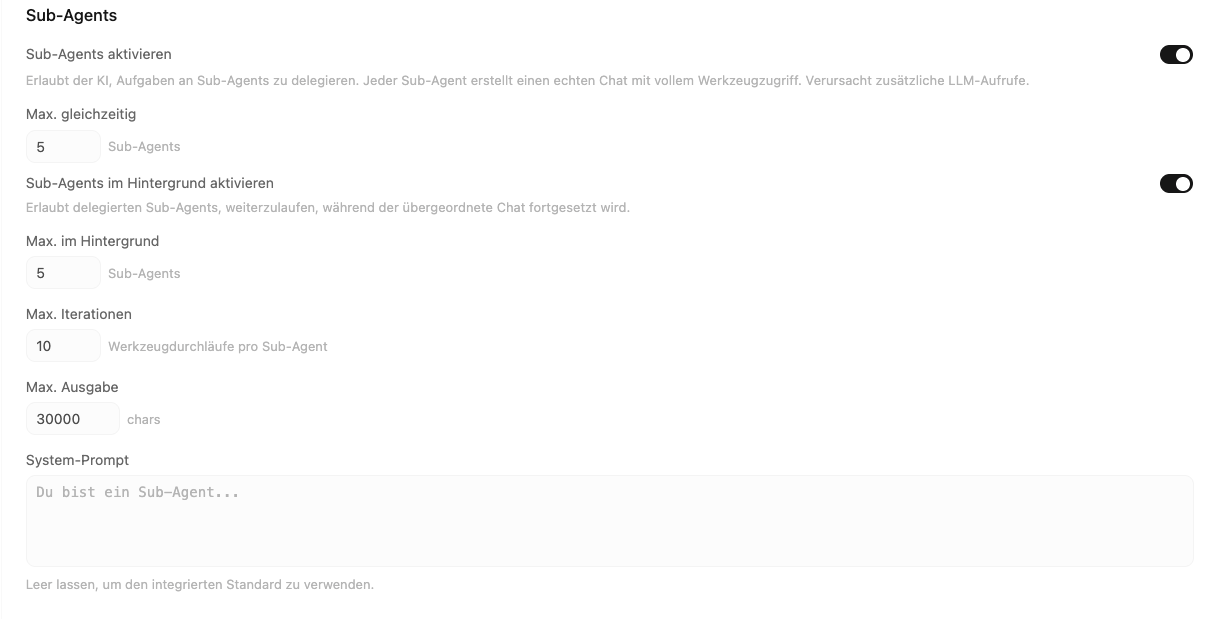
Enable sub-agents
"Enable sub-agents" turns the feature on for the NENNA instance.
If the setting is off, the AI cannot delegate tasks to sub-agents.
Each sub-agent creates its own chat and makes additional model calls. Using sub-agents can therefore increase token usage and the number of LLM calls.
Good to know
Enabling the setting does not mean sub-agents are started for every request. The model in use decides, depending on the task and the prompt, whether delegation makes sense.
Max. concurrent
"Max. concurrent" sets how many sub-agents may run at the same time.
Example:
Max. concurrent: 5
This allows a maximum of ten sub-agents to work in parallel.
If the model wants to use more sub-agents, further tasks have to wait until capacity is free again.
A lower value limits parallel model calls and can therefore reduce load and resource usage.
Recommendation
To start, a value of 3 to 5 sub-agents makes sense. Then watch actual usage and adjust the value if needed.
Enable sub-agents in the background
"Enable sub-agents in the background" lets delegated sub-agents keep working while the parent chat already continues.
Without this feature, the main agent normally waits for the results of the delegated task before it continues with them.
Background processing is best suited to large, independent tasks whose result is not needed right away for the next step.
Recommendation
If you are introducing sub-agents for the first time, you can start without background processing. This keeps the behavior easier for administrators and users to follow.
Max. in background
This setting determines how many sub-agents may work in the background at the same time.
Example:
Max. in background: 5
This allows up to ten such background tasks to run at the same time.
The setting only matters if "Enable sub-agents in the background" is turned on.
A lower value helps control the number of background tasks running at the same time.
Max. iterations
"Max. iterations" sets the maximum number of tool runs a single sub-agent may perform.
Example:
Max. iterations: 10
During its task, a sub-agent can, for example, analyze information, call a tool, evaluate its result, and then use another tool.
Each of these steps can cause further processing and model calls.
A higher value allows larger tasks.
Caution: At the same time, processing time, token usage, and the number of tool calls can go up.
Good to know
10 iterations do not mean every sub-agent automatically runs 10 steps. The value only defines the maximum number of possible tool runs.
Max. output
"Max. output" limits how large the result of a sub-agent may be when it is returned to the parent agent.
Example:
Max. output: 30,000 characters
The limit stops very large results from taking up too much of the main model's context.
For most analysis and research tasks, the default value leaves enough room.
System prompt
In the "System prompt" field, administrators can add basic extra instructions for all sub-agents.
For example, you could set:
"Process only the subtask assigned to you. Answer in the language of the original user request. Summarize your results in a structured and precise way. Clearly distinguish between facts and assumptions."
The field can also stay empty.
In that case, NENNA uses the built-in default for sub-agents.
Recommendation
Leave the field empty at first and use the built-in default. Add your own system prompt only when you want to tune the behavior of the sub-agents for your organization.
Recommended starting configuration
For a first rollout, you can start with this configuration:
Enable sub-agents:
On
Max. concurrent:
3 to 5
Enable sub-agents in the background:
Off
Max. in background:
3 to 5, relevant once background processing is turned on
Max. iterations:
10
Max. output:
30,000 characters
System prompt:
Leave empty
These values can be adjusted later depending on usage, the AI models in use, and the needs of your organization.