
With the Fair Use Limits, NENNA makes sure the available AI resources are provided fairly and reliably to all users. For this, certain model categories have usage quotas that reset automatically at regular intervals.
Important:
Standard models and High Performance models have separate usage quotas. If you reach the limit of one category, the quota of the other category is not affected.
What are Fair Use Limits?
Fair Use Limits restrict the use of AI models within a defined period. There are two model categories: Standard models and High Performance models.
Each of the two categories has its own usage quota. The quotas reset automatically.
Why are there Fair Use Limits?
Depending on the model and the request, AI models need different amounts of computing power. Very large requests or very intensive use can take up a lot of resources.
The Fair Use Limits help spread the available resources evenly and keep NENNA running stably for all users.
Standard models and High Performance models
Standard models
Standard models are suited to most daily tasks, for example:
Write and revise texts
Draft emails
Summarize documents
Analyze information
Answer general questions
High Performance models
High Performance models are especially powerful models that can be used for complex tasks, extensive analyses, or demanding reasoning.
These include, for example, especially powerful models from the Claude Opus model class.
Note:
Which models are classed as High Performance can change as the available range of models develops. NENNA assigns them centrally.
Separate quotas for both model categories
Standard models and High Performance models have usage quotas that are separate from each other.
Category | Quota | Period |
|---|---|---|
Standard models | up to 300 messages | 3 hours |
High Performance models | up to 100 messages | 3 hours |
For example, if you reach the quota for High Performance models, you can still use Standard models as long as quota is left there.
How is usage calculated?
Technically, one message is standardized at a usage of up to 30,000 tokens. Both the input and the generated reply are counted.
Normal chat requests are usually well below this value. The limit therefore matters mainly with very intensive use or with especially large requests.
Where can I see my current usage?
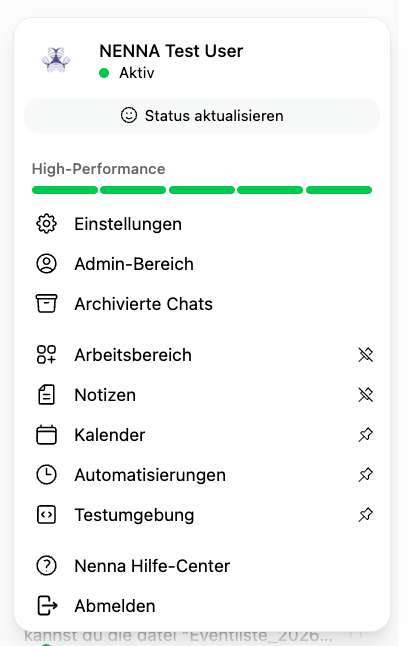
If Fair Use Limits are enabled for your NENNA instance, you will see a small usage indicator in the sidebar. It shows the current state of your quota and the time left until the next reset.
What happens when a limit is reached?
Once the quota of a model category is used up, no further requests can be processed through that category for the time being.
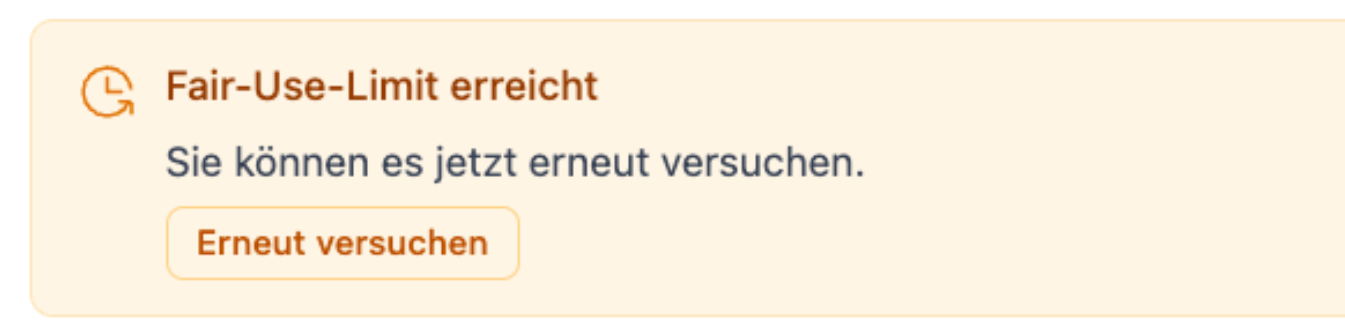
NENNA shows a notice "Fair-Use-Limit erreicht" directly in the chat. It shows which quota is affected and when it is expected to be available again.
Example:
"You have reached the Fair Use limit for Standard models. Resets in 4 minutes."
Once the quota has been reset, you can run the original request again with "Erneut versuchen". A new chat or signing in again is not needed.
When is the quota available again?
The Fair Use quotas reset automatically every 3 hours.
The reset happens at fixed times. The time left until the next reset is shown directly in NENNA. Once the reset has happened, the models concerned can be used normally again.
How does the NENNA KI Auto Router behave?
The NENNA KI Auto Router automatically picks a suitable AI model depending on the task. Models from the High Performance category can be used too.
At the moment, the Auto Router does not yet switch automatically to another model category when a Fair Use Limit is reached. If the quota of the selected model is reached, the Fair Use message appears.
Planned extension:
In future, the NENNA KI Auto Router is meant to switch automatically to an available fallback model when a quota is used up. This should allow requests to keep being processed where possible.
What do the limits mean in everyday use?
For normal use of NENNA, the Fair Use Limits usually have no effect. The available quotas are set so that typical workflows are still possible without restrictions.
The limits matter especially with very intensive use, very many requests within a short time, or especially large requests.
If the limit of a category is reached, you can either wait for the next reset or, if quota is still left, use a model from the other model category.
Can Fair Use Limits be disabled or adjusted?
Fair Use Limits are enabled or disabled per NENNA instance. Administrators currently do not have this setting as a self-service function.
If you want Fair Use Limits enabled or disabled for your instance, please contact your NENNA contact person or NENNA support.
Please note:
Individual higher or lower Fair Use Limits for single customers cannot be configured at the moment. The limits apply the same way to each model category.
Frequently asked questions
Do the Fair Use Limits apply to all NENNA customers?
No. The function is enabled per NENNA instance. If Fair Use Limits are not enabled for your instance, these limits are not applied there.
Are Standard and High Performance one shared quota?
No. Both categories have separate quotas. Reaching the limit of one category does not automatically use up or block the quota of the other category.
Will my user account be blocked if I reach a limit?
No. Your account stays fully active. Only further requests through the affected model category cannot be run for the time being, until the next reset.
Do I have to start a new chat after the reset?
No. You can keep working in the existing chat and send the request again with "Erneut versuchen".
How long do I have to wait?
The maximum wait is within the current 3-hour period. NENNA shows you directly when the affected quota will be reset.
Which models belong to High Performance?
These are especially powerful models, for example models of the Claude Opus class. The exact assignment can change with the available range of models and is managed centrally by NENNA.
Does the Auto Router switch automatically to another model?
Not yet. If the quota of the selected model is reached, the Fair Use message appears. Automatic fallback logic is planned as a future extension of the NENNA KI Auto Router.
Can my administrator raise the limit?
No. Individual limits per customer cannot be set at the moment. If you have questions about the Fair Use Limits of your instance, please contact your NENNA contact person.